基于瑞萨RZ/G2L微处理器的eMMC双阶段混合烧录方案
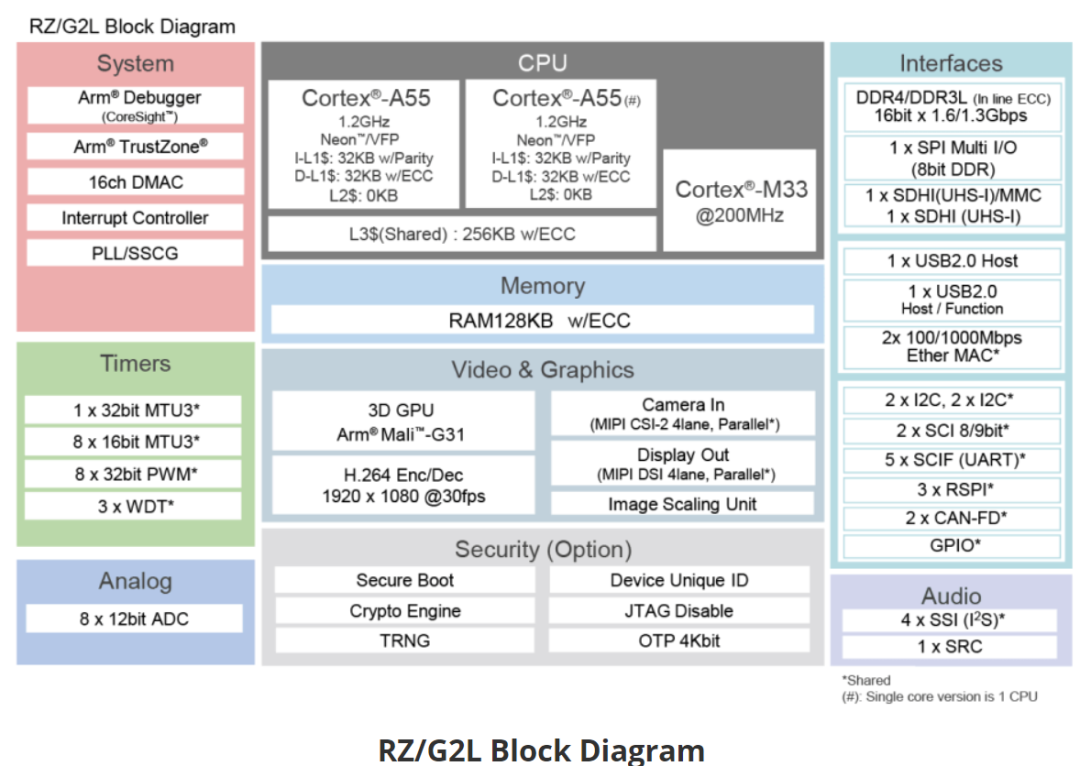
RZ/G2L微处理器配备Cortex-A55(1.2GHz)CPU、16位DDR3L/DDR4接口、带Arm Mali-G31的3D图形加速引擎以及视频编解码器(H.264)。此外,这款微处理器还配备有大量接口,如摄像头输入、显示输出、USB 2.0和千兆以太网,因此特别适用于入门级工业人机界面(HMI)和具有视频功能的嵌入式设备等应用。
在基于瑞萨RZ/G2L MPU的嵌入式开发过程中,传统eMMC烧录流程效率成为生产瓶颈——单板烧录耗时约5分30秒,严重制约批量生产效率。针对这一痛点,我们创新性地推出了双阶段混合烧录方案,巧妙结合SCIF与Fastboot技术优势,实现了多设备并行烧录,大幅缩短了整体耗时。
双阶段技术架构
01Bootloader烧录阶段
通过SCIF接口批量写入U-Boot至多块主板eMMC
支持并行操作,避免单板串行等待
02系统镜像烧录阶段
配置U-Boot启用Fastboot over USB功能
PC端Fastboot工具同时操控多块主板,实现分区创建、内核及文件系统并行写入
效率对比:提升显著
详细实施方案
一、U-Boot配置
在源码中启用Fastboot和USB功能支持,并配置相关功能。
配置文件路径为:u-boot/git/configs/smarc-rzg2l_defconfig
关键配置示例
左右滑动查看完整内容
# Fastboot功能配置
CONFIG_USB_FUNCTION_FASTBOOT=y
CONFIG_FASTBOOT_BUF_ADDR=0x4D000000
CONFIG_FASTBOOT_BUF_SIZE=0x8000000
CONFIG_FASTBOOT_USB_DEV=28
CONFIG_FASTBOOT_FLASH=y
CONFIG_FASTBOOT_FLASH_MMC_DEV=0
CONFIG_CMD_FASTBOOT=y


# USB功能配置
CONFIG_USB=y
CONFIG_USB_XHCI_HCD=y
CONFIG_USB_EHCI_HCD=y
CONFIG_USB_GADGET=y
CONFIG_USB_GADGET_MANUFACTURER="Renesas"
CONFIG_USB_GADGET_VENDOR_NUM=0x18D1
CONFIG_USB_GADGET_PRODUCT_NUM=0x4E23
完成配置和源码修改后编译,得到fip_pmic.srec、bl2_bp_pmic.srec,再通过SCIF下载模式使用Flash Writer工具烧录BL2与FIP至eMMC。
二、Fastboot烧录流程
设备端操作
在U-Boot控制台中执行以下命令进入Fastboot模式:
左右滑动查看完整内容
setenv serial#'Renesas1'# 自定义设备唯一标识
saveenv
fastboot usb 27 # 启动USB Fastboot服务
PC端操作
1验证设备连接
左右滑动查看完整内容
fastbootdevices
2创建并烧写MBR分区表(包含500MB启动分区和3.5GB根文件系统分区)
左右滑动查看完整内容
fastbootflash mbr part.mbr
3创建启动分区镜像
左右滑动查看完整内容
ddif=/dev/zero of=boot.img bs=1M count=256
sudomkfs.vfat -v -c -F32boot.img
4挂载并复制内核文件
左右滑动查看完整内容
sudomount boot.img /mnt
cpkernel /mnt
cpdtb /mnt
sudoumount /mnt
5烧录分区并重启
左右滑动查看完整内容
fastbootflash0:1boot.img#启动分区
fastbootflash0:2core-image-minimal-smarc-rzg2l.ext4 # 根文件系统
fastbootreboot
启动参数配置
左右滑动查看完整内容
setenvbootargs 'rw rootwait earlycon root=/dev/mmcblk0p2'
setenvbootcmd 'mmc dev0; fatload mmc0:10x48080000 Image-smarc-rzg2l.bin;
fatloadmmc0:10x48000000 Image-r9a07g044l2-smarc.dtb; booti0x48080000 -
0x48000000'
saveenv
多设备并行烧录实战
通过设备唯一ID识别,实现单PC控制多设备同步烧录:
设备端设置
左右滑动查看完整内容
setenvserial# 'Device_001' # 设备唯一标识
saveenv
fastbootusb0
PC端并行操作
左右滑动查看完整内容
# 查看已连接设备
fastbootdevices


# 终端1操作设备1
fastboot-s Device_001 flash mbr part.mbr
fastboot-s Device_001 flash0:1boot.img
fastboot-s Device_001 reboot


# 终端2同时操作设备2
fastboot-s Device_002 flash mbr part.mbr
fastboot-s Device_002 flash0:1boot.img
fastboot-s Device_002 reboot
附:单个板子烧录成功log
fastboot log
左右滑动查看完整内容
g2l@g2l-VirtualBox:~$ fastboot devices
Renesas1fastboot
g2l@g2l-VirtualBox:~$ fastboot flash mbr part.mbr
targetreported max download size of134217728bytes
sending'mbr' (0KB)...
OKAY[ 0.007s]
writing'mbr'...
OKAY[ 0.007s]
finished. total time:0.014s
g2l@g2l-VirtualBox:~$ fastboot flash0:1boot.img#启动分区
targetreported max download size of134217728bytes
sending'0:1' (85274KB)...
OKAY[ 7.543s]
writing'0:1'...
OKAY[ 4.010s]
finished. total time:11.553s
g2l@g2l-VirtualBox:~$ fastboot flash0:2core-image-minimal-smarc-rzg2l.ext4
targetreported max download size of134217728bytes
Invalidsparse file format at header magic
erasing'0:2'...
OKAY[ 5.145s]
sendingsparse '0:2'1/1(80256KB)...
OKAY[ 7.144s]
writing'0:2'1/1...
OKAY[ 54.646s]
finished. total time:66.935s
g2l@g2l-VirtualBox:~$ fastboot reboot
rebooting...
finished. total time:5.601s
g2l@g2l-VirtualBox:~$
boot log
左右滑动查看完整内容
=> fastboot usb 0
** Bad device specification mmc mbr_a **
Couldn't find partition mmc mbr_a
** Bad device specification mmc mbr **
Couldn't find partition mmc mbr
** Bad device specification mmc mbr **
Couldn't find partition mmc mbr
Starting download of 512 bytes
downloading of 512 bytes finished
fastboot_mmc_flash_write: updating MBR
........ success
** Bad partition specification mmc 0:1_a **
Couldn't find partition mmc 0:1_a
Starting download of 87320576 bytes
..........................................................................
downloading of 87320576 bytes finished
Flashing Raw Image
........ wrote 87320576 bytes to '0:1'
** Bad partition specification mmc 0:2_a **
Couldn't find partition mmc 0:2_a
Erasing blocks 1026048 to 8388608 due to alignment
........ erased 3769630720 bytes from '0:2'
Starting download of 82182548 bytes
..........................................................................
downloading of 82182548 bytes finished
Flashing sparse image at offset 1026048
Flashing Sparse Image
........ wrote 1184509952 bytes to '0:2'
resetting ...
NOTICE: BL2: v2.9(release):v2.5/rzg2l-1.00-3883-gc314a391c-dirty
NOTICE: BL2: Built : 1418, Sep 192023
NOTICE: BL2: eMMC boot from partition 1
NOTICE: BL2: Load dst=0x1f840 src=(p:1)0x20000(256) len=0x10(1)
NOTICE: BL2: eMMC boot from partition 1
NOTICE: BL2: Load dst=0x1f9a0 src=(p:1)0x20010(256) len=0x28(1)
NOTICE: BL2: eMMC boot from partition 1
NOTICE: BL2: Load dst=0x44000000 src=(p:1)0x20090(256) len=0x6069(49)
NOTICE: BL2: eMMC boot from partition 1
NOTICE: BL2: Load dst=0x1f840 src=(p:1)0x20000(256) len=0x10(1)
NOTICE: BL2: eMMC boot from partition 1
NOTICE: BL2: Load dst=0x1f9a0 src=(p:1)0x20010(256) len=0x28(1)
NOTICE: BL2: Load dst=0x1f9a0 src=(p:1)0x20038(256) len=0x28(1)
NOTICE: BL2: eMMC boot from partition 1
NOTICE: BL2: Load dst=0x50000000 src=(p:1)0x26100(304) len=0xc0120(1538)
NOTICE: BL2: Booting BL31
NOTICE: BL31: v2.9(release):v2.5/rzg2l-1.00-3883-gc314a391c-dirty
NOTICE: BL31: Built : 1418, Sep 192023
U-Boot 2021.10 (Feb 182025 - 1150 +0800)
CPU: Renesas Electronics CPU rev 1.0
Model: smarc-rzg2l
DRAM: 1.9 GiB
WDT: watchdog@0000000012800800
WDT: Started with servicing (60s timeout)
MMC: sd@11c00000: 0, sd@11c10000: 1
Loading Environment from MMC... OK
In: serial@1004b800
Out: serial@1004b800
Err: serial@1004b800
U-boot WDT started!
Net: eth0: ethernet@11c20000
Hit any key to stop autoboot: 0
switch to partitions#0, OK
mmc0(part 0) is current device
方案适用场景
01推荐使用场景
产线混合生产不同硬件版本
系统镜像需要频繁迭代的开发阶段
小批量多配置定制化订单
02不适用场景
无USB调试接口的主板版本
方案价值
通过SCIF+Fastboot两阶段混合烧录方案,RZG2L平台不仅实现了多设备并行烧录,还大幅提高了生产和开发效率。该方案尤其适合小批量定制化生产与快速迭代的开发阶段,为嵌入式系统的量产部署提供了一种高效可行的思路。
- 双车交出亮眼成绩单 蔚来ES9、全新ES8各自领跑细分市场
- 极氪9X德国市场起售价约93万元 成为欧盟售价最高中国量产车
- 成都丰田普拉多中东版最高降7.8万 欢迎前来试驾
- 高新西皓影新能源价格16.59万起 优惠高达6.00万
- 中创新航合肥研究院正式落地
- UAES-新一代车载充配电单元CharCON5U | 申报2026第八届金辑奖最佳技术实践应用奖
- 用得爽!七部门新政给老百姓的用车红利清单
- 鸿蒙座舱+乾崑智驾,启境GX7开启预售,预计9月内上市
- 高阶驾乘质感,藏在安静的座舱里|S320L隔音升级
- 以车为媒,万象共生——第二十一届西安国际车展金秋重磅启幕
- 哪些电池技术能降低新能源车使用成本?
- 固态电池技术为什么能降低汽车自燃风险?
- 换电模式为什么能促进车企资源整合?
- 汽车智驾技术的价值分布对投资有什么启示?
- 宝马首次展示全新一代驾驶辅助系统:新世代BMW iX3率先全系标配,未来更多BMW车型将搭载
- 为什么新能源车电池回收有机会?